

Introduction
Traditional B2B cold outreach relies on manual effort: sales development reps (SDRs) manually copying contacts from LinkedIn, pasting them into spreadsheets, running manual email verification, and manually sending sequences. This approach is slow, error-prone, and impossible to scale without expanding headcount linearly.
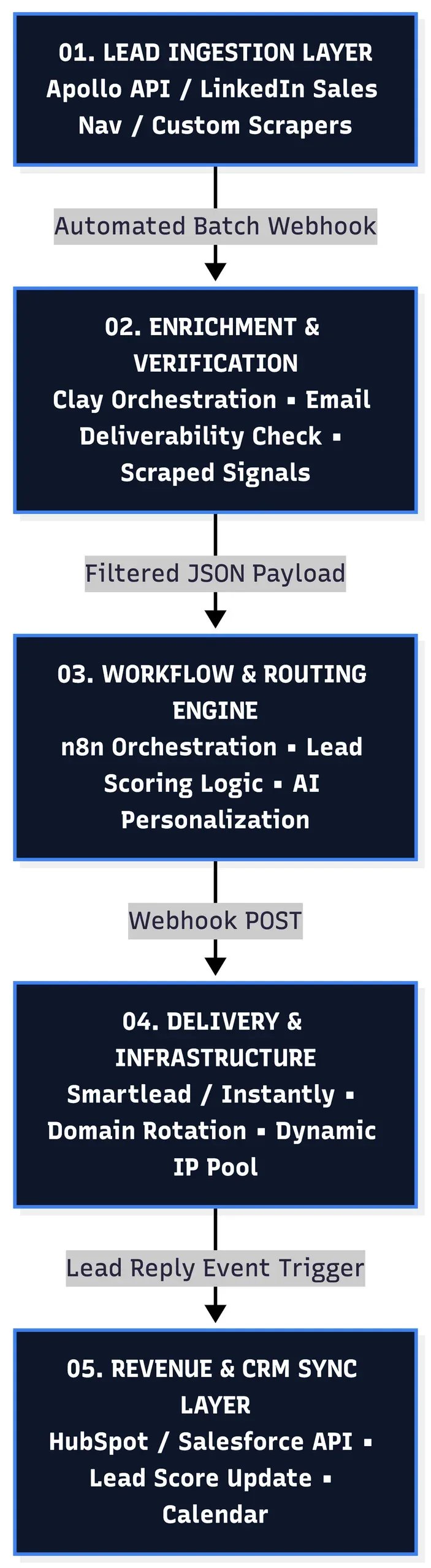
At Isotope Blue, we treat client acquisition as a software engineering challenge. A Programmatic Cold Outreach Pipeline transforms manual prospecting into an event-driven microservice stack—automatically discovering target leads, verifying inbox deliverability, enriching contact metadata, routing personalized campaign payloads, and syncing intent signals directly to your CRM.
Here is the exact architectural blueprint for engineering a programmatic acquisition engine from scratch.
High-Level Architecture Blueprint
Step 1: Infrastructure & Domain Isolation
Before sending a single email, you must isolate your primary domain. Never run cold outreach campaigns off your main operating domain (e.g., company.com). A spike in spam reports will burn your primary Google Workspace/Microsoft 365 tenant, severely impacting operational deliverability.
Domain Setup Protocol
- Acquire Secondary Domains: Purchase 3–5 secondary domains that mimic your core brand (e.g.,
getcompany.com,companyio.com,usecompany.com). - Configure DNS Records: Set up strict authentication parameters on every domain:
- SPF (Sender Policy Framework): Authorize senders.
- DKIM (DomainKeys Identified Mail): Cryptographic signing for email authenticity.
- DMARC (Domain-based Message Authentication, Reporting, and Conformance): Policy enforcement set to
p=noneinitially, moving top=quarantine.
- Automated Domain Warm-up: Connect isolated inboxes to an automated warm-up pool (via Smartlead or Instantly) for 14–21 days to build initial domain reputation with internet service providers (ISPs).
Step 2: Automated Lead Ingestion & Verification
Manual list building introduces bad data into your outreach pipelines, increasing bounce rates above the critical 2% threshold that triggers ISP rate-limiting.
- Ingestion Trigger: Webhooks pull target prospect accounts based on precise ICP metrics (Industry, Employee Count, Revenue, Technology Stack used).
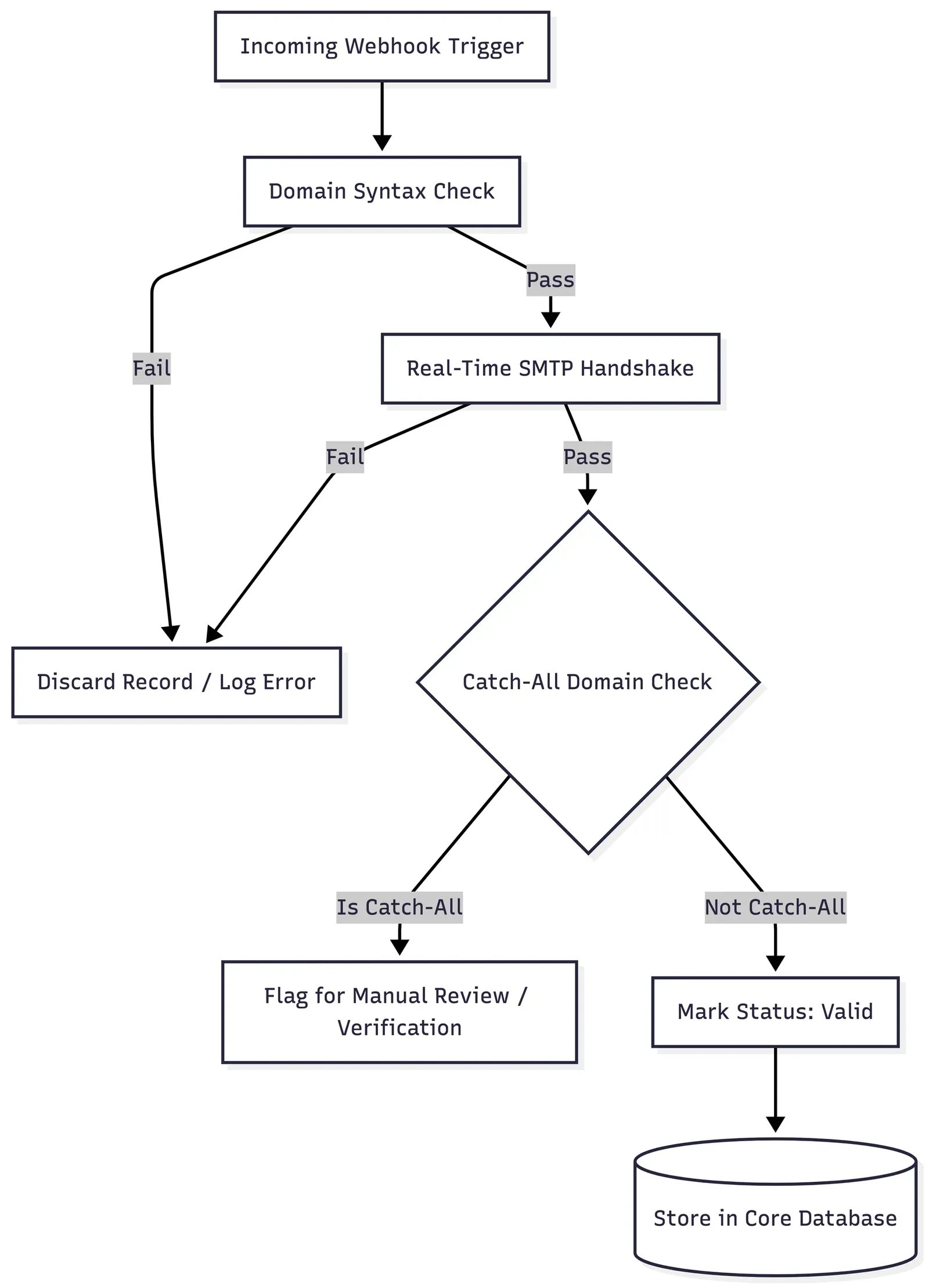
- Real-time Email Verification: Before writing to your core database, pass each email payload through a multi-tier verification check:
- MX record lookup.
- Real-time SMTP handshake (pinging the mail server without sending an actual message).
- Catch-All domain flag processing.
- Storage: Only store records marked as
Valid. DiscardInvalidorUnverifiablerecords immediately to protect sender reputation.
Step 3: Data Enrichment & AI Scoring Logic
Generic templates yield sub-1% response rates. To drive high conversion, we programmatically enrich prospect records with real-time operational signals.
Enrichment Workflow (Powered by Clay / n8n)
- Signal Pulling: Automatically scrape target company job boards (identifying pain points), tech stack changes (detecting tool migrations), or recent funding announcements.
- Lead Scoring Formula: Calculate a dynamic score based on profile fit and urgency metrics:
$$\text{Lead Score} = (\text{Title Fit} \times 0.4) + (\text{Tech Stack Match} \times 0.3) + (\text{Growth Trigger} \times 0.3)$$
- AI Personalization: Pass enriched attributes (company news, active hiring roles) through a structured LLM prompt to generate a single, hyper-relevant introductory sentence.
Step 4: Campaign Routing & Delivery Optimization
Once enriched and scored, prospects enter the delivery queue. We use n8n as our central workflow engine to balance daily volume and manage sender throttling.
// Example Structured Webhook Payload sent to Outreach Infrastructure
{
  "prospect_id": "usr_98412",
  "email": "cto@targetcompany.com",
  "first_name": "Alex",
  "company_name": "TargetCorp",
  "lead_score": 85,
  "ai_intro": "Noticed TargetCorp is scaling your GCP infrastructure team...",
  "assigned_inbox": "inbox_04@getcompany.com"
}
Sending Rules & Safety Limits
- Maximum Daily Volume: Cap sending volume to 30–50 cold emails per inbox/day.
- Dynamic Throttling: Randomize delays between sends (300 to 900 seconds) to emulate human sending behaviors.
- Inbox Load Balancing: Evenly distribute outgoing emails across your domain pool to prevent any single inbox from exceeding safe thresholds.
Step 5: Event-Driven Reply Handling & CRM Sync
The pipeline’s value culminates in how quickly it processes incoming intent signals.
When a prospect replies:
- Webhook Event Trigger: The outreach delivery platform fires a
reply_receivedwebhook to the n8n logic engine. - Sentiment Analysis: An AI module categorizes the reply:
- Meeting Requested: Instantly trigger an urgent Slack/Teams notification, update CRM stage to
Meeting Offered, and send calendar link. - Information Requested: Pass conversation history to an AI assistant to draft a contextual response for manual review.
- Not Interested / Unsubscribe: Automatically log
Opt-Outflag in PostgreSQL database and remove prospect from all active sequences globally.
- Meeting Requested: Instantly trigger an urgent Slack/Teams notification, update CRM stage to
System Metrics & Expected Outcomes
By engineering an automated, programmatic cold outreach pipeline, businesses eliminate manual admin tasks and achieve predictable, scalable pipeline growth:
- 0% Manual Data Entry: Complete automation from lead ingestion to CRM logging.
- <1.5% Bounce Rates: Managed via automated pre-send verification pipelines.
- 3x–5x Increase in Response Rates: Driven by programmatic data enrichment and contextual AI personalization.
Ready to Automate Your B2B Growth Engine?
Stop relying on fragmented outreach tools and manual SDR workflows. Let’s design a unified acquisition pipeline built directly into your CRM.

Solutions: