

A Practical Guide to Production-Grade CI/CD, Container Orchestration, and Automated Failovers.
Deploying software updates to production should be a non-event. Yet, monolithic server restarts, unhandled database migrations, and improper load balancing routinely trigger service interruptions, dropped WebSocket connections, and 502 gateway errors.
Achieving true zero-downtime deployment requires isolating your application runtime, automating continuous delivery, and implementing zero-loss traffic routing. Below is the blueprint for configuring production-ready Docker clusters on Google Cloud Platform (GCP) using Google Kubernetes Engine (GKE), Artifact Registry, and GitHub Actions.
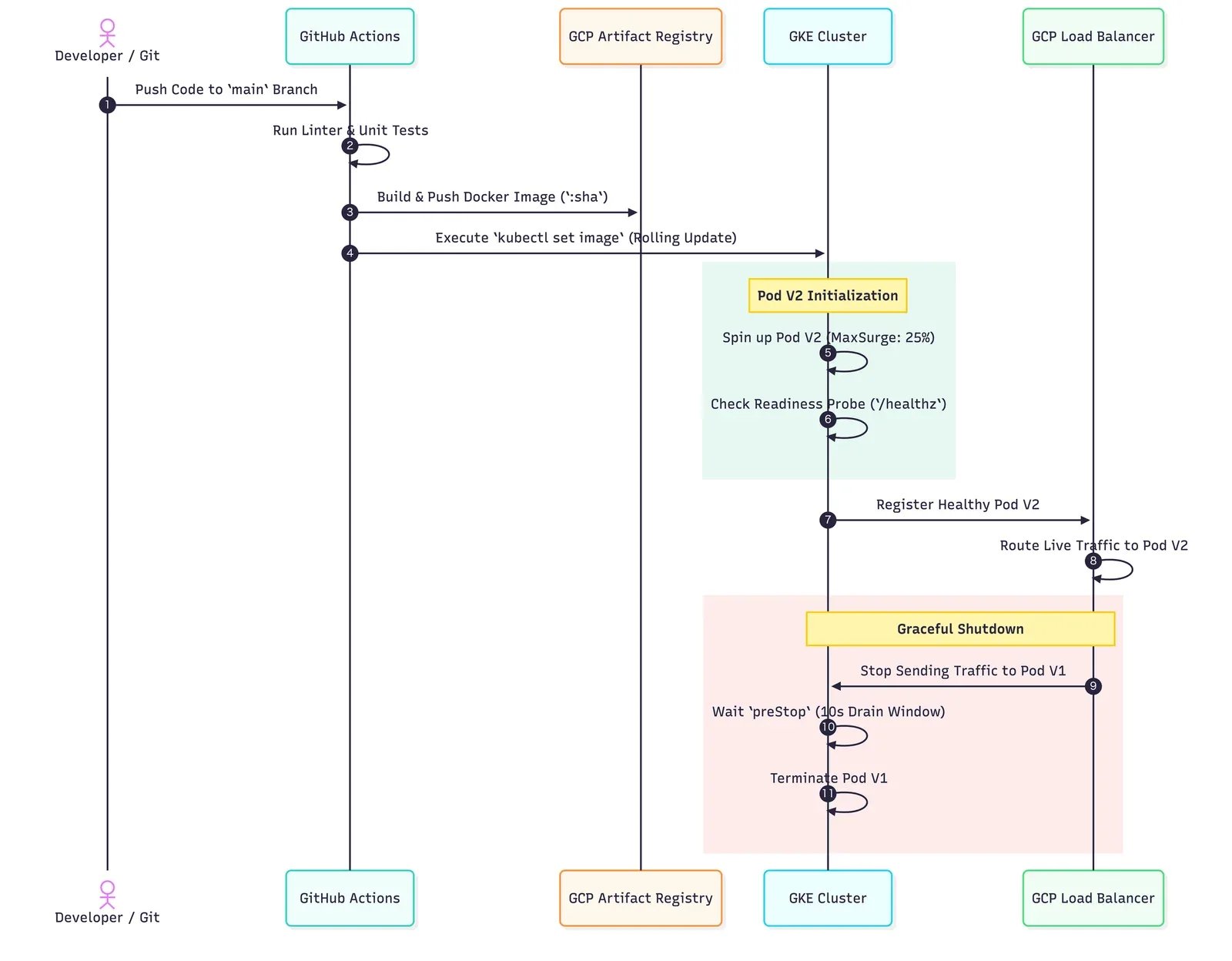
The Zero-Downtime Deployment Architecture
1. Containerization Best Practices (Dockerfile)
Zero-downtime begins at the container layer. Containers must handle shutdown signals (SIGTERM) gracefully to finish processing active requests before exiting.
# Multi-stage build for minimal image size and attack surface
FROM node:20-alpine AS builder
WORKDIR /app
COPY package*.json ./
RUN npm ci
COPY . .
RUN npm run build

FROM node:20-alpine AS runner
WORKDIR /app
ENV NODE_ENV=production

# Run as non-root user for cloud security standards
RUN addgroup --system --gid 1001 nodejs && adduser --system --uid 1001 appuser
COPY --from=builder /app/dist ./dist
COPY --from=builder /app/node_modules ./node_modules
COPY package.json ./

USER appuser
EXPOSE 3000

# Handle SIGTERM gracefully in Node.js
CMD ["node", "dist/server.js"]
2. Kubernetes Deployment Configuration (deployment.yaml)
To ensure GCP never routes traffic to a container that is still booting up or shutting down, configure Rolling Updates, Liveness Probes, and Readiness Probes.
apiVersion: apps/v1
kind: Deployment
metadata:
  name: isotope-backend-app
  namespace: production
spec:
  replicas: 4
  strategy:
    type: RollingUpdate
    rollingUpdate:
      maxSurge: 25%        # Create 1 new pod before killing an old one
      maxUnavailable: 0%   # Ensure 100% capacity remains active during rollouts
  selector:
    matchLabels:
      app: isotope-backend
  template:
    metadata:
      labels:
        app: isotope-backend
    spec:
      containers:
      - name: backend-api
        image: us-central1-docker.pkg.dev/isotope-blue/app-repo/backend:latest
        ports:
        - containerPort: 3000
        resources:
          requests:
            cpu: "250m"
            memory: "512Mi"
          limits:
            cpu: "500m"
            memory: "1024Mi"
        readinessProbe:
          httpGet:
            path: /healthz
            port: 3000
          initialDelaySeconds: 5
          periodSeconds: 5
        livenessProbe:
          httpGet:
            path: /healthz
            port: 3000
          initialDelaySeconds: 15
          periodSeconds: 10
        lifecycle:
          preStop:
            exec:
              command: ["/bin/sh", "-c", "sleep 10"] # Allow load balancer to deregister pod
3. Automated CI/CD Pipeline (GitHub Actions)
This pipeline builds your Docker container, authenticates securely to GCP using Workload Identity Federation (no static service account keys required), and triggers a rolling deployment in GKE.
name: Deploy Backend to GCP GKE

on:
  push:
    branches: [ main ]

env:
  PROJECT_ID: isotope-blue
  GAR_LOCATION: us-central1
  GKE_CLUSTER: isotope-prod-cluster
  GKE_ZONE: us-central1-a
  REPOSITORY: app-repo
  IMAGE: backend

jobs:
  setup-build-publish-deploy:
    name: Build and Deploy to GKE
    runs-on: ubuntu-latest
    steps:
    - name: Checkout Code
      uses: actions/checkout@v4

    - name: Authenticate to Google Cloud
      uses: google-github-actions/auth@v2
      with:
        workload_identity_provider: 'projects/123456789/locations/global/workloadIdentityPools/github-pool/providers/github-provider'
        service_account: 'github-deployer@isotope-blue.iam.gserviceaccount.com'

    - name: Set up Cloud SDK
      uses: google-github-actions/setup-gcloud@v2

    - name: Configure Docker for Artifact Registry
      run: |-
        gcloud auth configure-docker ${{ env.GAR_LOCATION }}-docker.pkg.dev --quiet

    - name: Build and Push Docker Image
      run: |-
        IMAGE_TAG=${{ env.GAR_LOCATION }}-docker.pkg.dev/${{ env.PROJECT_ID }}/${{ env.REPOSITORY }}/${{ env.IMAGE }}:${{ github.sha }}
        docker build -t $IMAGE_TAG .
        docker push $IMAGE_TAG

    - name: Get GKE Credentials
      uses: google-github-actions/get-gke-credentials@v2
      with:
        cluster_name: ${{ env.GKE_CLUSTER }}
        location: ${{ env.GKE_ZONE }}

    - name: Deploy Rolling Update to GKE
      run: |-
        IMAGE_TAG=${{ env.GAR_LOCATION }}-docker.pkg.dev/${{ env.PROJECT_ID }}/${{ env.REPOSITORY }}/${{ env.IMAGE }}:${{ github.sha }}
        kubectl set image deployment/isotope-backend-app backend-api=$IMAGE_TAG -n production
        kubectl rollout status deployment/isotope-backend-app -n production
4. Operational Checklist for Zero-Downtime Releases
- Database Schema Migrations: Always run backward-compatible schema changes (e.g., add new columns before deprecating old ones) prior to rolling out code deployments.
- Graceful Shutdown Signals: Ensure backend server code captures
process.on('SIGTERM')to close active database pools and connections cleanly during the 10-secondpreStopwindow. - Zero-Downtime Health Checks: Ensure
/healthzendpoints check critical dependencies (database connections, Redis cache) before returning200 OKto the Kubernetes readiness probe.
Unify Your Stack Today
Eliminate vendor overhead and build a technical infrastructure that scales automatically across cloud, codebase, and customer acquisition.

Solutions: