

Executive Summary
Static landing pages suffer from a major conversion flaw: they present identical copy and value propositions to vastly different audience segments. A enterprise CTO clicking a LinkedIn ad for data compliance has completely different pain points than a Head of Growth searching for automated outreach scripts.
In this playbook, we break down how to build programmatically dynamic landing funnels using Next.js App Router and Edge Middleware. By reading inbound URL parameters and prospect metadata at the edge, you can personalize headlines, tech stack badges, case studies, and CTAs before the initial HTML is served—maintaining sub-second load times while dramatically improving conversion rates.
1. System Architecture Overview
Traditional personalization relies on client-side JavaScript that executes after the page loads. This causes visible text flickering (Layout Shift) and degrades Core Web Vitals scores.
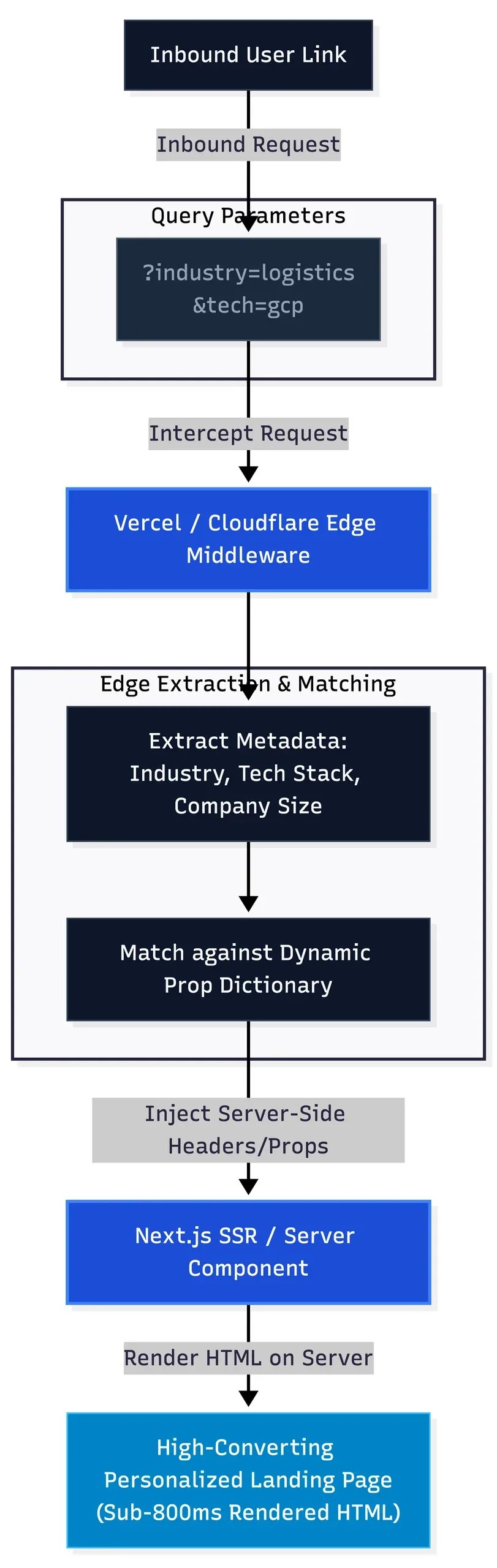
Our edge-first approach executes routing and content selection before rendering:
2. Step 1: Configuring Edge Middleware for Zero-Flicker Interception
Using Next.js middleware.ts, we extract URL query parameters or custom headers sent from programmatic email campaigns (e.g., Smartlead or Clay webhooks) and set personalized context headers.
// middleware.ts
import { NextResponse } from 'next/server';
import type { NextRequest } from 'next/server';

export function middleware(request: NextRequest) {
  const url = request.nextUrl;
  const industry = url.searchParams.get('industry') || 'default';
  const techStack = url.searchParams.get('tech') || 'cloud';

  // Clone headers and pass personalized context down to Server Components
  const requestHeaders = new Headers(request.headers);
  requestHeaders.set('x-prospect-industry', industry);
  requestHeaders.set('x-prospect-tech', techStack);

  return NextResponse.next({
    request: {
      headers: requestHeaders,
    },
  });
}

export const config = {
  matcher: '/lp/:path*',
};
3. Step 2: Designing the Dynamic Content Dictionary
To keep application logic clean, separate presentation components from your personalization data dictionary. Create a structured file that maps prospect attributes to specific copy variations, case studies, and social proof badges.
// lib/funnelData.ts
export interface FunnelVariation {
  headline: string;
  subheadline: string;
  featuredCaseStudy: string;
  primaryCTA: string;
}

export const funnelDictionary: Record<string, FunnelVariation> = {
  logistics: {
    headline: "Automate Your Fleet Operations & B2B Partner Acquisition",
    subheadline: "Unify real-time telemetry, automated booking dispatch, and hotel partner outreach into one reliable engine.",
    featuredCaseStudy: "Kyoto Logistics: 20% Cold Sign-up Rate",
    primaryCTA: "Audit Your Logistics Stack",
  },
  travel: {
    headline: "Scale Global Experience Platforms Without Database Latency",
    subheadline: "Decoupled web engines engineered to sync 6,000+ live products across 58 countries effortlessly.",
    featuredCaseStudy: "ExperiaHub: 68% Faster Load Speed",
    primaryCTA: "Audit Your Marketplace Architecture",
  },
  default: {
    headline: "Unified Technology & Growth Infrastructure",
    subheadline: "We bridge cloud architecture, modern software engineering, AI workflow automation, and acquisition.",
    featuredCaseStudy: "See Architecture Deployments",
    primaryCTA: "Schedule Technical Audit",
  },
};
4. Step 3: Server-Side Page Component Assembly
Because we utilize React Server Components in Next.js, the personalized HTML is generated on the server. The user receives a pre-rendered page tailored precisely to their profile, resulting in zero content layout shift (CLS) and maximum performance.
// app/lp/[slug]/page.tsx
import { headers } from 'next/headers';
import { funnelDictionary } from '@/lib/funnelData';

export default async function DynamicLandingPage() {
  const headerList = await headers();
  const industry = headerList.get('x-prospect-industry') || 'default';

  // Match industry variant or fallback to default
  const content = funnelDictionary[industry] || funnelDictionary.default;

  return (
    <main className="max-w-6xl mx-auto px-6 py-20">
      <div className="text-center space-y-6">
        <span className="text-blue-500 font-mono text-sm tracking-wide uppercase">
          {industry !== 'default' ? `Engineered for ${industry}` : 'Enterprise Growth Stack'}
        </span>
        <h1 className="text-5xl font-bold tracking-tight text-white">
          {content.headline}
        </h1>
        <p className="text-xl text-slate-400 max-w-2xl mx-auto">
          {content.subheadline}
        </p>
        <div className="pt-4">
          <a href="/book-audit" className="bg-blue-600 hover:bg-blue-700 text-white font-semibold py-3 px-8 rounded-lg shadow-lg transition-all">
            {content.primaryCTA}
          </a>
        </div>
      </div>

      {/* Featured Social Proof Module */}
      <div className="mt-16 p-8 border border-slate-800 rounded-xl bg-slate-900/50">
        <h3 className="text-sm font-semibold text-slate-400 uppercase tracking-wider">Relevant Case Blueprint</h3>
        <p className="text-lg font-medium text-white mt-2">{content.featuredCaseStudy}</p>
      </div>
    </main>
  );
}
5. Architectural Key Takeaways & Performance Benchmark
Implementing dynamic landing pages at the edge delivers three massive advantages over traditional marketing approaches:
- Sub-800ms Page Load Times: Serving personalized content from Edge Networks (Vercel/Cloudflare) bypasses client-side API fetches and avoids heavy DOM manipulation script bloat.
- 2x to 3x Conversion Rate Uplift: Speaking directly to a prospect’s specific tech stack or industry pain points eliminates bounce rates caused by generic value propositions.
- Seamless CRM & Attribution Integration: Passing metadata parameters (e.g.,
utm_campaign,company_id) down through form submit actions ensures your CRM receives enriched lead attributes automatically.