

Executive Summary
Manual lead entry, bulk CSV imports, and delayed CRM updates are operational vulnerabilities. When a high-intent prospect submits a form, requests a demo, or engages with an outreach campaign, a multi-hour delay in sales follow-up drastically degrades conversion rates.
Relying on human data entry or standard scheduled polling intervals creates data silos and latency. Event-driven, bi-directional webhooks replace passive scheduled syncs with immediate, reactive logic. This playbook details how we engineer bi-directional webhook architecture connecting web platforms, serverless middleware, databases, and enterprise CRMs (such as HubSpot or Salesforce) to eliminate manual lead handling entirely.
The Architecture: Polling vs. Event-Driven Sync
Traditional CRM integrations rely on scheduled batch processing—pulling or pushing updates every few hours. This introduces lag and increases API rate-limit errors.
An event-driven pipeline operates on immediate state changes:
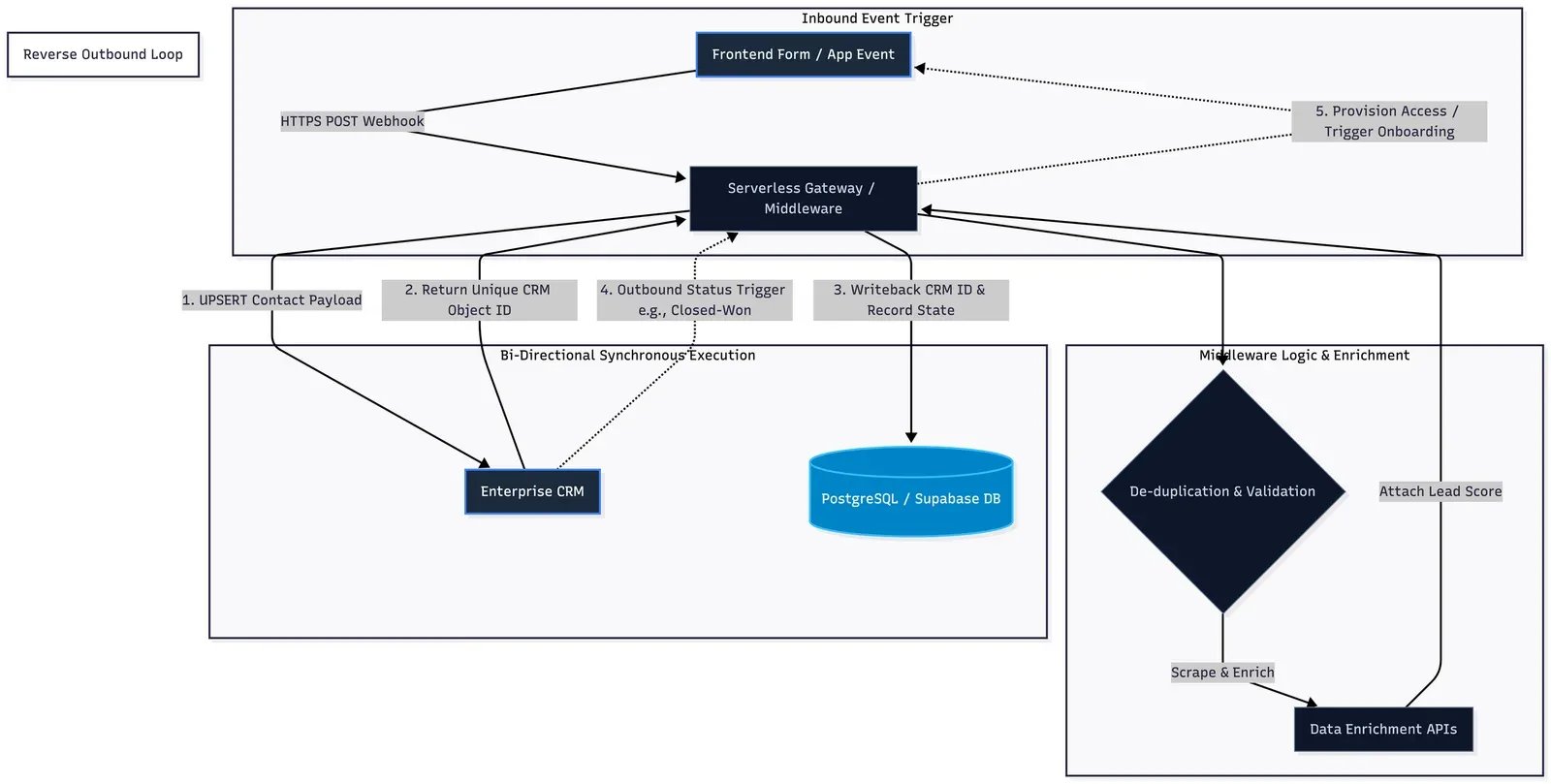
- Inbound Trigger: A prospect performs an action (form submission, payment, link click).
- Payload Dispatch: An HTTPS POST payload containing JSON-formatted event data is immediately fired.
- Middleware Orchestration: Serverless endpoints (hosted on Node.js middleware or n8n) validate, sanitize, and enrich the incoming payload via third-party data APIs.
- Bi-Directional Execution: The payload updates both the internal production database (e.g., PostgreSQL or Supabase) and the primary CRM concurrently, returning updated CRM record IDs back to the local database.
Step-by-Step Implementation Blueprint
Step 1: Inbound Webhook Listener & Payload Validation
Instead of pointing form submissions directly to CRM endpoints—which exposes API keys and lacks custom validation—route all events through a lightweight backend listener or middleware webhook URL.
// Example Inbound JSON Webhook Payload
{
  "event": "lead.created",
  "timestamp": 1772378214,
  "data": {
    "email": "alex.chen@enterprise.com",
    "first_name": "Alex",
    "last_name": "Chen",
    "company": "Enterprise Corp",
    "source_channel": "organic_search",
    "intent_score": 85
  }
}- Security Protocol: Verify signatures (HMAC SHA-256) on incoming webhooks to ensure requests originate exclusively from trusted applications.
Step 2: Data Enrichment & Logic Routing
Once received, the middleware intercepts the payload before it reaches the CRM:
- De-duplication Check: Query the CRM API via email address to check if a contact record already exists.
- Real-time Enrichment: Trigger automated calls to data enrichment APIs to automatically attach employee count, technical stack, and company revenue.
- Lead Scoring & Routing: Apply conditional logic. If
intent_score >= 80andemployee_count > 50, flag the lead as High Priority and auto-assign an account executive.
Step 3: Bi-Directional CRM Push & Sync Back
Execute an UPSERT request to the CRM API to either create a new object or update an existing one without creating duplicate records.
// Example Node.js / Express snippet for HubSpot API UPSERT
const axios = require('axios');

async function syncToCRM(leadData) {
  const url = `https://api.hubapi.com/crm/v3/objects/contacts/batch/upsert`;

  const payload = {
    inputs: [
      {
        idProperty: "email",
        id: leadData.email,
        properties: {
          email: leadData.email,
          firstname: leadData.first_name,
          lastname: leadData.last_name,
          company: leadData.company,
          hs_lead_status: leadData.intent_score > 80 ? "QUALIFIED" : "RAW",
          lifecyclestage: "lead"
        }
      }
    ]
  };

  const response = await axios.post(url, payload, {
    headers: { Authorization: `Bearer ${process.env.CRM_API_KEY}` }
  });

  return response.data;
}
Once the CRM creates or updates the record, it returns a unique crm_object_id. The middleware writes this ID back to the local database, creating a persistent, bi-directional cross-reference key.
Step 4: Reverse Webhook Setup (CRM to Production System)
To complete the bi-directional loop, configure outbound webhooks within the CRM settings:
- Trigger Event: Lead status changes in CRM (e.g., deal marked as Closed-Won by sales rep).
- Action: CRM fires an outbound webhook back to your backend production system.
- Result: Automatically provisions user accounts, triggers onboarding emails, and unlocks platform access with zero human intervention.
Architectural Best Practices
- Idempotency Standards: Ensure processing endpoints are idempotent. If a network retry fires the same webhook twice, the backend must process it once without duplicating database records.
- Asynchronous Queue Management: Use message queues (e.g., Redis Pub/Sub or RabbitMQ) to handle heavy bursts of incoming webhooks during traffic spikes without dropping requests.
- Error Logs & Fallback Retries: Configure automatic retry mechanisms with exponential backoff for failed API endpoints to ensure 100% data delivery.
Key System Impact
- Zero Latency: Lead processing time reduced from hours to under 800 milliseconds.
- 100% Data Integrity: Total elimination of human data entry errors and missing field attributes.
- Automated Operational Workflows: Instant sales notification routing and client onboarding triggers.
Unify Your Technology & Growth Stack
Stop juggling fragmented vendors. Partner with an engineering team that connects high-availability cloud architecture, custom software, autonomous AI, and automated B2B acquisition into one seamless engine.

Solutions: